
This is a little tutorial about how to use the $5/month T-Zones plan, an Apple Powerbook running Tiger, and a Motorola v330 (any Motorola phone with GPRS and Bluetooth will work) to access pretty much everything on the Internet via proxy. You can also get the $20/month T-Zones service and get access to everything without a proxy. I would like to credit Mike Chambers with his info that got this all working for me originally on my Motorola v600 and Panther (read this info for a v600 and AT&T here)
Here is what you need to do:
- Call T-Mobile and activate the $5/month T-Zones plan
- Wait until it is activated(2hrs-3days wait)
- Try to access T-Zones on the phone
- Go to Ross Barkman’s Modem Scripts page and download the Motorola GPRS Scripts
- Move the “Motorola GPRS CID1” to ~/Library/Modem Scripts
- Go to the Bluetooth Preference pane in System Preferences
- Click on the “Set up New Device…” button
- Check “Access the Internet…” and “…use GPRS”
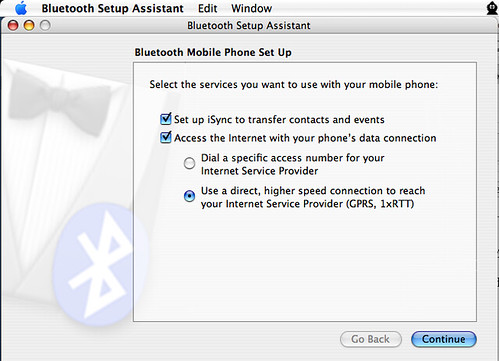
- Choose the “Motorola GPRS CID1” Script
- Go to Internet Connect and make sure you are connecting to “wap.voicestream.com” and leave account name or password
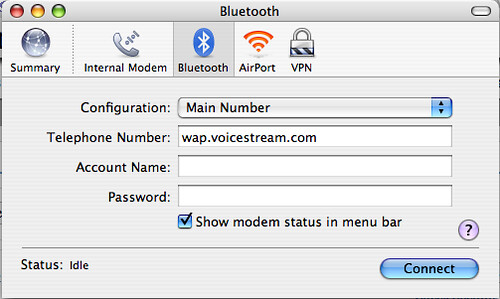
- Then choose the Network Pane in System Preferences and select the Bluetooth tab
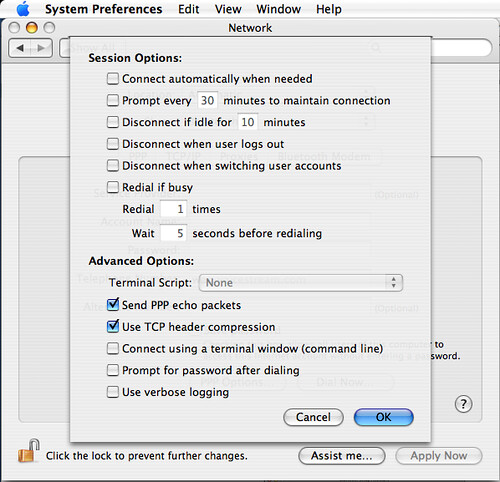
- Click the PPP Options button and check the “echo packets” and “header compression options” (Note: YMMV try leaving them unchecked and see which is better for you)
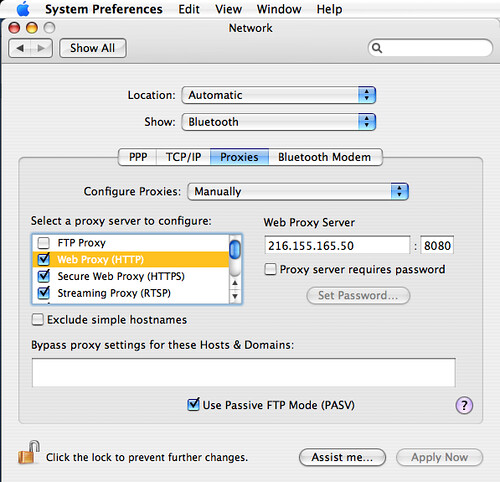
- Now finally change the Proxy settings to “216.155.165.50” port 8080 (it is T-Mobile’s proxy, check at whois.net) for HTTP b/c port 80 is blocked on the $5 plan
- If you are having trouble leave comments